If you are a Bihar government employee whether working as a school teacher, police officer, or administrative staff, getting physical copies of your monthly payslip no longer requires manual paperwork or visiting the Treasury office. The Finance Department of Bihar provides a centralized portal called CFMS Bihar (e-Nidhi) to manage payroll, GPF, and salary disbursements online.
This guide breaks down how to log in, access the Payee Self-Service portal, and download your e-nidhi bihar salary slip in PDF format.
What is e-Nidhi CFMS Bihar?
The Comprehensive Financial Management System (CFMS), commonly known as e-Nidhi Bihar, is the official digital portal managed by the Finance Department, Government of Bihar.
It acts as a single-window portal for over 500,000 state government employees to track monthly earnings, tax deductions, and provident fund statements securely.
Key Details Listed on Your e-Nidhi Payslip
-
Employee Identification: Name, CFMS Employee ID, PRAN/GPF Number, Designation, and Department.
-
Earnings Breakdown: Basic Pay, Dearness Allowance (DA), House Rent Allowance (HRA), and Medical or Transport Allowances.
-
Deductions: National Pension System (NPS) contribution, General Provident Fund (GPF), Group Insurance Scheme (GIS), Professional Tax, and Income Tax (TDS).
-
Net Payable Salary: The final amount credited to your registered bank account.
Prerequisites Before Logging In
To successfully download your payslip from the e-Nidhi portal, make sure you have the following details ready:
-
CFMS User ID & Password: Provided by your Drawing and Disbursing Officer (DDO) or regional head office.
-
Registered Mobile Number: Required for OTP verification.
-
PRAN, GPF, or Aadhaar Number: Useful for profile verification if prompted.
Step-by-Step Guide: How to Download e-Nidhi Bihar Salary Slip Online
Follow these steps to generate and download your monthly salary slip PDF:
Step 1: Visit the Official Portal
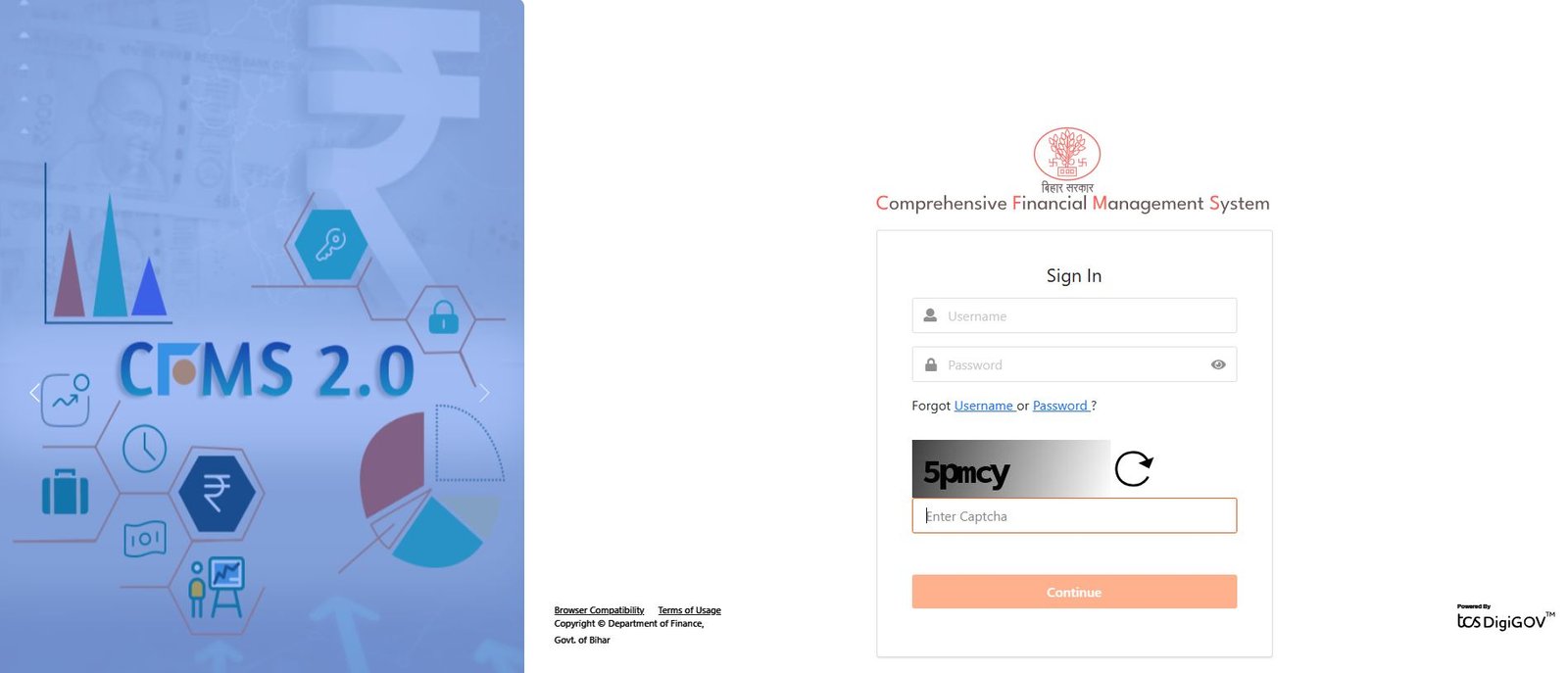
Open your browser and navigate to the official e-Nidhi CFMS portal.
Step 2: Access the Employee Login Module
On the homepage, select the Payee Self Service / e-GPF Self Service option. This redirects you to the secure employee login screen.
Step 3: Enter Your Login Credentials
-
Type in your User ID / Employee ID and Password.
-
Fill in the displayed Captcha Code accurately.
-
Click on Continue or Login.
Step 4: Complete OTP Verification
An OTP will be sent to your registered mobile number. Enter the verification code and click Get Me In or Submit to open your dashboard.
Step 5: Navigate to Employee Reports
Once inside your dashboard:
-
Click on the Employee Self Services tab.
-
Select Reports > Salary Statement / Monthly Payslip.
-
Choose the Financial Year and the specific Month you need.
Step 6: Download the PDF
Click on the Generate or Download PDF button. Review the details on screen and save the document to your phone or computer for future reference.
Troubleshooting Common e-Nidhi Portal Issues
| Issue | Recommended Solution |
| Forgot Password | Click on the “Forgot Password” link on the login page. Enter your Employee ID to receive a password reset link or OTP on your registered mobile number. |
| Mobile Number Not Updated | Contact your departmental DDO/Admin to update your active mobile number in the CFMS database. |
| Portal Loading Error | Clear your browser cache or switch to Microsoft Edge / Chrome in Desktop Mode. |
If technical issues persist, reach out to the Finance Department Helpdesk at cfmshelpdesk@bihar.gov.in or call 0612-2211355.
What to Look For in a Formatted Pay Slip
Whether you work for the government or run a private business, an official pay stub should clearly separate gross earnings from statutory deductions.
If you want to examine standard layout structures—or check how allowances, deductions, and tax calculations should look on a finished document—you can inspect a realistic payslip template to see how proper salary slips are organized.
Need Custom Pay Slips for Your Own Business or Team?
While government portals like e-Nidhi handle public sector payroll, small business owners, contractors, and freelancers often need a fast way to issue official proof of income for their workers.
If you need to generate clean, accurate salary statements for your team, try our online payslip generator. It allows you to enter basic earnings, allowances, and custom deductions to create formatted PDF pay stubs in under two minutes—completely free, with no software installation required.
Frequently Asked Questions (FAQs)
1. How can I download my e-Nidhi Bihar salary slip without a password?
If you forget your password, you cannot directly download the slip. You must use the Forgot Password option on the login portal to generate an OTP on your registered mobile number and set a new password.
2. What is the CFMS Employee ID?
The CFMS ID is a unique numeric identifier assigned to every Bihar government employee by the Finance Department for payroll, GPF, and service record management.
3. Can I download e-Nidhi salary slips for previous years?
Yes. The portal allows you to select previous financial years under the Employee Reports section to download archived salary slips and annual income statements.
4. What should I do if my salary slip shows incorrect deduction details?
If you notice errors in your GPF, NPS, or Income Tax deductions, contact your department’s Drawing and Disbursing Officer (DDO) immediately to make corrections in the system.