

Top 10 Free Payslip Generators in 2025

A payslip is a document provided to an employee at the end of the month, along with their salary, which includes the salary records and the tax deducted.

With a huge number of calculations and compliance regulations involved, it is always a critical task to create the right data. A need for a system that not only generates the right data but also calculates the numbers correctly.

An online payslip generator manages and controls the whole payroll process on one user-friendly interface. The system is not effective in terms of data management, but it also reduces risk and cost to improve efficiency and data protection.

This guide compares the top 10 free payslip generators in 2025 for your business. Let us take a look at them.

Top 10 Free Payslip Generators

The following are the top 10 free payslip generator for your business:

1) Payslip maker free

With the payslip maker free, you can create your own salary slip without any hassle. No matter if you’re a self-employed individual or an employee in need of immediate proof of earnings, this free salary slip generator will help you create one.

Pros:

  • Easy-to-use interface.
  • Free salary slip generator.
  • Employers, HR departments, and small businesses can easily create a salary slip.
  • You can generate editable salary slips without any hassle.

Cons:

  • Currently there are limited payslip templates.
Payslip Maker Free - CTA

2) Zoho

Zoho brings a diverse salary structure that suits each employee and your firm’s hierarchical structure with custom earnings and deductions. With a modern UI at your fingertips, you will get to know Zoho Payroll faster and complete payroll instantly.

Pros:

  • You can generate payslips for free.
  • Designed for Indian audiences, which supports indian statutory components.
  • You can upload your company’s logo and customize your pay period.

Cons:

  • It is limited in functionality.
  • Once salary is added to the field, you cannot hide it.
  • This requires manual data entry for each employee and each pay period:

3) Paysliper

With paysliper, you can create an easy slip by using the employee payslip generator. Check that the final payslip meets Indian statutory payroll requirements. The tool may allow you to add custom fields, but accuracy is a must.

Pros:

  • You can claim support for different pay period frequencies.
  • You can download your paystub in PDF format.
  • This platform is web-based and can be accessed through phone and desktop easily.

Cons:

  • It lacks advanced features such as automatic calculations and bulk slip generation.
  • For huge organizations that need a complex payslip, which might not scale with per per-pay tool.

4) Hmware

Hmware is a free payslip generator in India tool which can be used to design salaryslip and can download it in PDF format. While the targeted audience in India might be small business owners, it eases the use of speed by avoiding heavy payroll software.

Pros:

  • It is free to use, and it’s a web-based interface means there is no need to install specific software.
  • It is flexible for small team members because there is no heavy setup required for it.

Cons:

  • For firms with many employees, frequent pay cycles might use a tool that can become cumbersome because each payslip needs manual input, and there is no mention of advanced automation.

5) Asanify

Asanify Payslip Software provides an easy-to-use cloud-based solution for companies to generate professional, branded salary slips in minutes. It allows employers to customize formats and gives employees immediate access to payslips via web or mobile, supporting urgent needs such as loan applications or insurance claims.

Pros:

  • The user can choose to show bank details and daily status per employee.
  • Quick generation of a salary slip using the easy payslip generator is a hassle-free process to use.
  • Suitable for the indian audience who need an instant salary slip.

Cons:

  • It is suitable for small business owners and freelancers who need a customized payslip for their clients, but with its basic level powers, it does not support full functionality.
  • Third-party integration is not as mature as compared to some other payroll tools.

6) PHP Payroll

PHP Payroll is a free payslip tool that lets businesses create quick and professional slips instantly in PDF format. 

Pros:

  • Easy-to-use interface.
  • Good for small business owners and freelancers to instantly create pay stubs.

Cons:

  • It is a basic tool that lacks advanced features like automated statutory calculations.
  • There is no mention of data security features, which is a concerning thing while handling sensitive data.

7) Salarybox

Salarybox is a mobile all-in-one application for Indian business owners that streamlines compliance as well as HR management.

Pros:

  • Salarybox supports automated salary calculations and digital payslips, which reduces manual effort and ensures error-free calculations.
  • With this tool, you can integrate tracking attendance and payroll, which also offers a real workforce solution for management.

Cons:

  • Salarybox does not have an intergenerational facility available with other HR software.
  • The starter pack is affordable, but to get all modules, you will need to pay a fixed amount, which might not be suitable for freelancers to pay.

8) Keka

The Keka Payslip Generator is a free payslip generator tool provided by Keka HR & Payroll that allows employers to quickly create professional salary slips by entering company details, employee information, earnings, deductions, and pay period.

Pros:

  • Its interface is clean and easy to use, and is created for accuracy.
  • Employees can download their slips from the portal, which is helpful in bulk slip generation.

Cons:

  • Large organizations with highly customized salary structures or international payroll requirements may find the tool less flexible than bespoke enterprise payroll solutions.
  • This tool requires manual entry of data and is designed in a very generic way 

9) HR Stop

HRStop is a cloud-based, all-in-one HRMS and payroll platform designed to manage the entire employee lifecycle, from hiring to retirement.

Pros: 

  • HR Stop has strong automation, and it helps in reducing the need for multiple free payslip tools.
  • The platform supports customization and API integration, which is helpful if your business is growing.

Cons:

  • This tool has a slower response time and has an unclear pricing structure for its specific needs

10) Conta

Conta Invoice Generator is a free, browser-based billing tool designed for freelancers, small businesses, and contractors– especially in India – allowing you to generate professional invoices in minutes by entering client and service details.

Pros:

  • This tool allows you to create slips in under 1 minute by using the employee payslip generator. 

Cons:

  • The generator has a basic feature and lacks advanced features like recurring invoices and customer databases.

FAQs

1) Is a payslip generator free to use?

Free payslip generator is a tool that helps users create free slips for their business. Employers can add the relevant components of an employee’s salary to an existing template to create a payslip.

2) How accurate is the digital payslip generator?

Paystub generators usually include built-in calculations for taxes, deductions, and other payroll components. This reduces the risk of errors compared to manual calculations, ensuring your pay stubs are accurate and comply with relevant regulations.

3) How is a payslip verified?

Banks and lenders check salary slips against bank statements and tax records. They may also contact employers to confirm the details.

Key Takeaways

Choosing the right free payslip generator in 2025 depends on your business needs, whether you are a freelancer, small business owner, or HR professional. Each tool offers distinct benefits, including automation, accuracy, easy customization, and record-keeping. 

While free versions are suitable for basic payroll management, exploring paid plans can provide advanced features such as tax compliance and integrations.

What Is a Payslip? Complete Guide for Employees

Are You An Employee Searching for Information About Payslips?

If you are employed and wondering “what is a payslip,” then this information guide is the place for you! Understanding your payslip can be the gateway to financial security and prosperity.

The issue of a payslip can be more complex than simply listing basic salary and deductions, to meet company and labor standards accurately and legally. Employers need the correct payslip created as accurately as possible in order to maintain transparency while preventing potential payroll errors from occurring.

Read this blog to gain more knowledge of what a payslip means, its format and benefits, as well as other related topics.

What Is A Payslip?

A payslip or salary slip issued by an employer to an employee containing details of his/her earnings during any particular pay period is known as a payslip or salary slip.

Payslips provide an overview of wages, deductions and other factors of salary structure. A payslip serves to show employees exactly how much money they’ve earned during a certain timeframe and how it came about.

Payslips are typically distributed either electronically or physically on a weekly, bi-weekly, or monthly basis, depending on the payroll frequency of their firm.

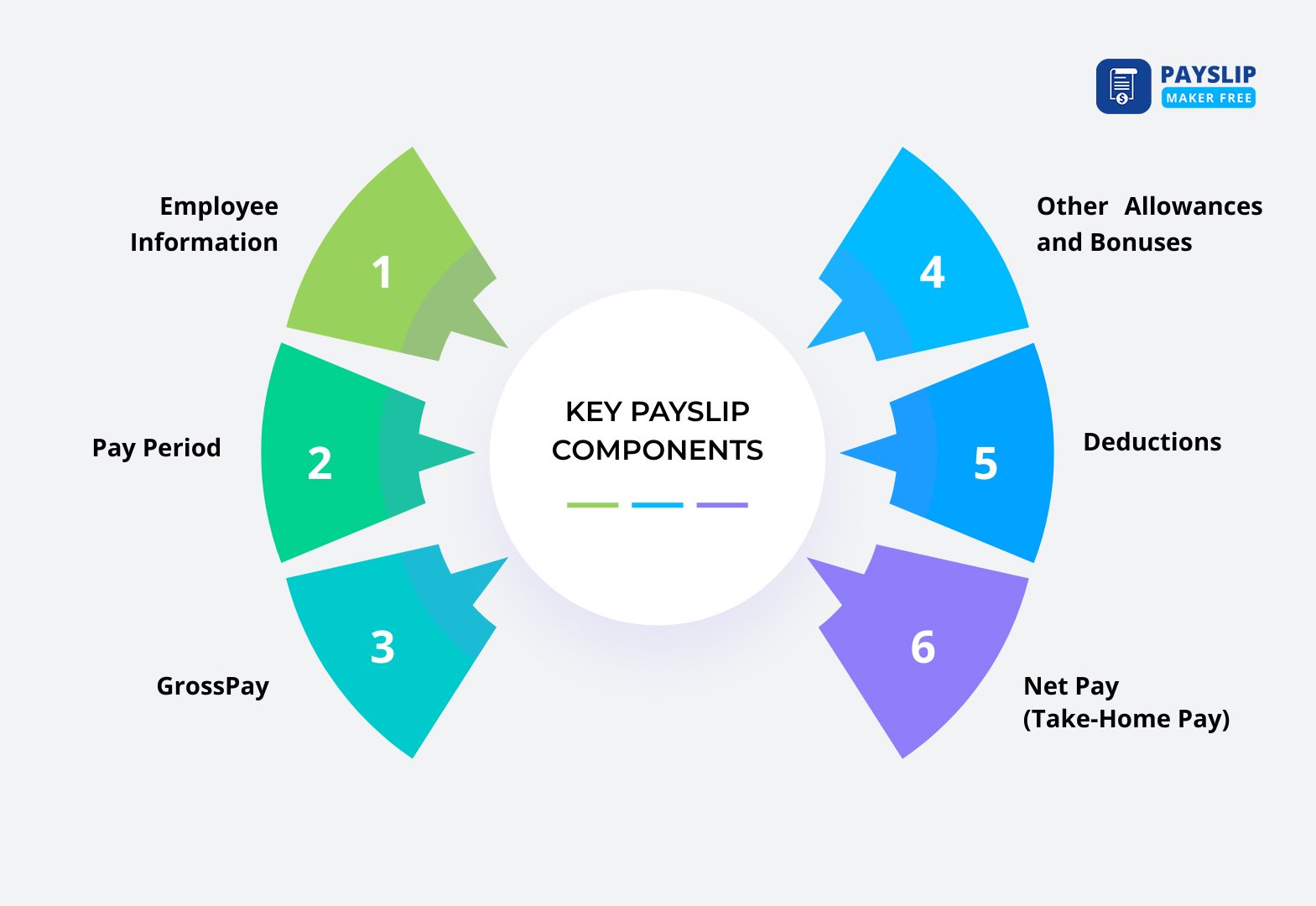
Key Payslip Components

Payslips provide vital information that enables employees to better comprehend how their salary is determined. Each section offers information regarding earnings, deductions, and the total pay structure.

Key Payslip Components

The following are among the common elements often included in a salary slip: 

  • Employee Information: Employee name, position or title, employee ID, tax number, and sometimes department.
  • Pay Period: The dates the payslip is covering, that is, the date range for each pay cycle.
  • Gross Pay: The total amount an employee receives prior to deduction, and includes the base salary, bonuses, commissions, and overtime.
  • Other Allowances and Bonuses: Other payments such as travel allowance, meal allowance, etc., or performance bonus.
  • Deductions: What is subtracted from gross pay, usually income tax, social security, health insurance, and pension funds, is considered as payslip deductions.
  • Net Pay (Take-Home Pay): An employee’s take-home pay after all deductions have been taken out and is typically directly deposited.

All of these areas in a payslip format are important to provide transparency in salaries and to assist employees in confirming their salary payments.

Wondering how to create an accurate payslip for yourself?

No more hassles to create an accurate and professional payslip, generate an easy and customized payslip.

Create a Payslip

Types Of Payslips You Need To Check

Employers may issue payslips in varied forms depending on their payroll system and organizational preference. Employees may get a payslip in a different format, and here the types of payslip are mentioned. 

The following are the most prevalent types of payslips that are given to employees:

  • Digital Payslips

    After the correct payslip calculation, the payslips are created and delivered electronically via email or accessed through a web-based employee portal. Digital payslips are convenient to access, more secure, and environmentally friendly than paper-based ones. They also simplify record-keeping for both employees and employers. You can generate an accurate payslip by using the Payslip Maker Free tool. 

  • Paper Payslips

    Conventional printed payslips are distributed to employees in paper form. Though organizations continue to implement this practice, it is slowly becoming obsolete with the increased trend towards electronic systems.

  • Automated Payslips

    Automated payslips are produced with payroll software to eliminate the potential for human error and to remain tax and labor law compliant. The system enables companies to conduct payroll efficiently, store data securely, and access previous payslips at any time with ease. 

Importance Of Payslip Format

Payslips are more than simply records of earnings; they play an indispensable role in financial management, compliance, and proof of employment.

The following are some of the most important reasons why payslips are necessary:

  • Employment Information

    Payslips provide official documentation of salary payments and employment histories, providing essential evidence when seeking new work, applying for visas/work permits or auditing companies; for employers, they provide key data for audits, financial reporting, or settling payroll disputes.

  • Financial Record Keeping

    Financial institutions typically request payslips from applicants when applying for credit cards, loans, or mortgages. Employers also use payslips as proof of salary information when offering benefits such as bonuses, insurance coverage or retirement contributions to employees.

  • Tax Compliance

    Payslips provide employees with a way of keeping track of income tax and statutory deductions, making filing their tax returns simpler and confirming they were properly made if necessary; additionally, they allow employees to claim refunds if required.

Payslips may also be requested as proof of income in legal and financial proceedings that require proof.

Payslips serve to promote transparency and compliance and are an essential employment and financial document for both employers and employees alike.

How To Read a Payslip & Prepare It

Both employers and employees need to know payslip meaning. Employees should monitor their earnings and deductions, while employers maintain correct payroll. 

Below is a step-by-step guide on reading a payslip and issuing one appropriately:

Reading a Payslip Creating a Payslip
Payslips provide an accurate view of an employee’s salary. Key areas to note include: Preparing payslips can be done both manually and with payroll software, each process involving similar steps. Here is what happens during each one:
Basic Salary: Regular pay depends upon an employee’s position and duties. Collect Information: Collect data regarding an employee’s base salary, allowances, bonuses, and deductions.
Allowances: Supplemental payments such as transport, housing, or performance bonuses may be awarded as supplements. Calculating Gross Salary: When calculating gross salary, add basic salary with allowances, bonuses, and any other remuneration to determine total earnings before any deductions.
Deductions: Subtractions made to a gross salary for taxes, insurance premiums, or loan repayments. Apply Deductions: Take into account any deductions available, such as taxes, insurance premiums, retirement fund contributions or any other that might apply when making deductions.
Net Salary (Take-Home Pay): Employee payment or paycheck is calculated after deductions. Determine Net Salary: After deductions have been taken out, an employee’s take-home pay will be determined.
Additional Incentives: Supplementary income sources such as overtime payment, bonus, or commission may help supplement existing sources. Produce the Payslip: Utilize either a template or payroll software to quickly create a comprehensive payslip outlining all earnings and deductions.
Pay Period: It is counted as the start and end dates of the salary cycle. Disburse the Payslip: Distribute payslips among employees in either written form or digitally via email or employee portals.

By performing these steps, employers can maintain precise payroll management, and employees can learn about their payslip format, deductions, and net earnings easily.

Payslip Examples

When creating a payslip for official or employee records, you can use dedicated payroll software or a free payslip maker, but make sure it covers the essential elements discussed earlier – basic salary, allowances, deductions, net pay, pay period, etc.

You can check the payslip example if you want to make your own payslip. Or you can generate the payslip by using our tool. 

FAQs:

1) What is payslip used for?

A payslip gives employees a detailed record of their pay, deductions, and net pay. It gives employees the ability to accurately keep track of their pay, while also giving them confidence that all payments are correct. And then of course, payslips are also valuable to document employment and income when applying for loans or tax filings, along with accurately tracking pay and verifying correct payments. 

2) What is the purpose of a payment slip?

Payslips give workers a detailed account of the calculation of their pay, including all allowances, bonuses, and deductions. They provide transparency between employers and workers regarding payments while reconciling whether taxes and other deductions have been accurately deducted from employees’ salary.

3) Is a salary slip given every month?

Yes, employees receive salary slips every month to provide them with an accurate picture of their finances and ensure compliance with labor law regarding timely salary documentation.

4) What is the full meaning of a payslip?

Payslips, more commonly referred to as salary statements or “Pay Slips”, are documents issued by employers which detail an employee’s pay and salary information, including basic pay, allowances, deductions, net salary and any applicable bonuses or tax withheld from earnings. Payslips serve as official evidence of earnings in various situations.

5) How do I get a payslip?

Payslips can be obtained either in printed form, digitally via email, or an employee portal from your employer – they’re typically generated by payroll departments and software – making them accessible and allowing you to verify both salary and deductions more accurately. Having access to this document is essential so you can remain accurate.