
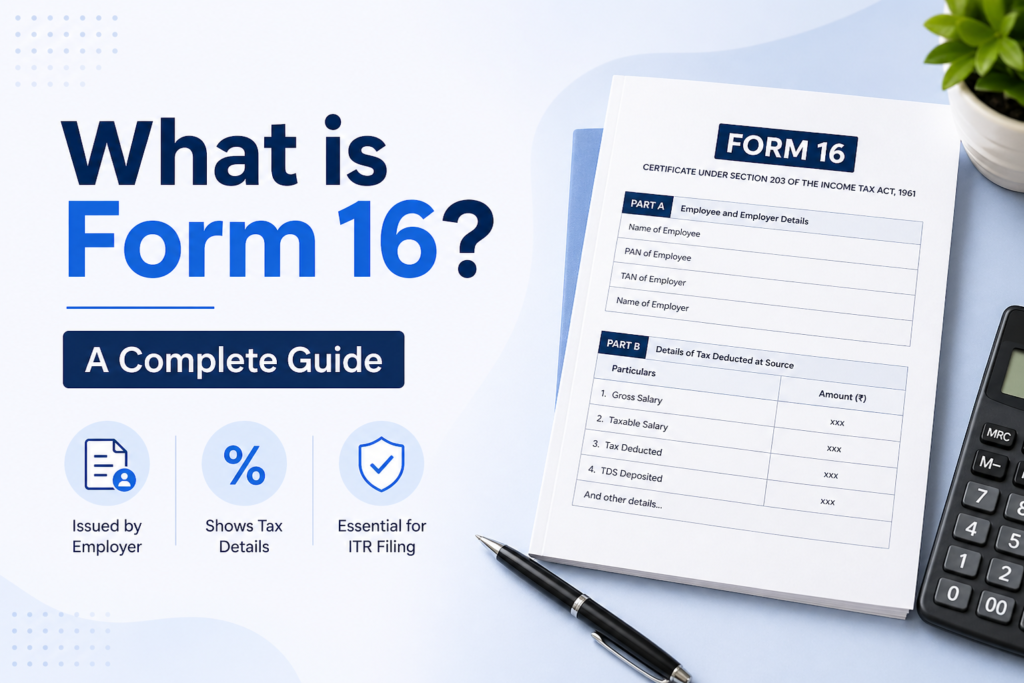
Form 16 is an income tax document issued by an employer that shows your total salary, tax deducted at source (TDS), and the tax deposited with the government.
Form 16 is an important document for salaried employees in India. It is issued by employers and shows your salary, TDS deducted, and tax deposited with the government. Understanding Form 16 meaning and how to download Form 16 is essential for filing your income tax return correctly.
Are you still waiting for your payslip to prove your income? With a pay slip generator, you can create accurate, professional payslips in minutes anytime you need them.
What is Form 16?
Form 16 is a TDS certificate issued by an employer under Section 203 of the Income Tax Act, 1961. It shows your total salary, tax deductions, and the amount of tax deposited with the government.
Why is Form 16 important?
Form 16 is important for each salaried employee in India. Below are some of the reasons behind its significance:
- Form 16 helps in filing income tax returns, as it contains complete details of your total income, deductions, and tax paid. It also makes it easier to download Form 16 for salaried employees and use it during ITR filing.
- It works as proof that your employer deducted the tax from your salary.
- Form no 16 is helpful in loan applications. Many banks ask for it to check your financial stability in the past.
- It provides you with a clear idea of how much tax you have paid and how your salary is formatted.
Components of Form 16
Below are the components of Form 16:
Part-A:
- Name and address of the employer and employees
- TAN of the employer
- PAN of the employer and employee
- Quarterly breakdown of the amount of TDS deducted against salary
- The date on which the monthly TDS is deducted and is deposited with the government
Part-B:
- Gross salary
- Exempt allowances under Section 10
- Income other than salary that is declared for TDS deduction purposes
- Deductions under Chapter VI-A
- Total taxable income offered for TDS deduction
- Estimated tax liability
- Relief under Section 89
Form 16 Format (PDF Structure Explained)
The following is the Form 16 format:
- Issued as a PDF document
- Structured in a tabular format
- Includes calculations, structure, and calculation tables
- Digitally signed
How to Download Form 16 from TRACES? (Step-by-Step Guide)
- In order to download the Form 16 from the Traces portal, employers must log in using their PAN and password.
- Navigate to the download tab and select Form 16.
- Choose Form 16 type and select the financial year.
- Verify PAN.
- Insert the TDS receipt number and select the date.
- Add the total tax deducted.
- Click on the submit button to download the form.
Income Tax Form 16: Who gets it?
Tax Form 16 is only issued to salaried employees whose employer deducts the TDS on their income under the Income Act 1961. Below is who gets it:
- Salaried employees working in a company.
- Employees whose income is taxable and TDS has been deducted by the employer.
- Employees who have provided PAN details to their employer.
Looking for easy income proof?
If you need quick income proof, you can also create a payslip online using a payslip generator.
How to get Form 16 Online?
Below is how you can get Form 16 online:
1- From Your Employer
- Form 16 is issued by your employer
- Log in to your company’s employee portal
- Go to tax documents
- Download it in PDF format
2- Through Traces Portal
- Only employers can generate it from the Traces portal
- You can ask your employer to re-download if needed
3- From Tax Filing Platforms
- If you use a platform like Clear Tax
- Your Form 16 is available there if previously updated.
Who receives Form 16?
Below are the following entities that receive Form 16:
- Salaried employees
- Employees with TDS deducted on salary
- People working in a private job
Difference Between Form 16 & Form 16A
| Factors | Form 16 | Form 16 A |
|---|---|---|
| Who issues it? | Employer | Financial Institutions |
| Frequency | Issued annually | Issued quarterly |
| Purpose | Evidence that tax is deducted at source from the employee’s income and deposited with the government | Issued when TDS is deducted on non-salary income (e.g., interest, commission, rent) |
| Threshold limit | When income exceeds the basic exemption limit | When income has crossed the threshold limit for TDS under the respective section |
| Rates | Slab rates | Rates as specified under respective sections |
Points to remember while checking Form 16
Below are the points to remember while checking Form 16:
- Once you receive Form 16, you should carefully verify all the details.
- Make sure to confirm the information mentioned in Form 16, for example, details of the amount of earnings, TDS deductions, and so on.
- If any information is mentioned incorrectly, the same should be rectified by immediately going to the HR/payroll/finance department of the organization.
- The corporation could then rectify its relinquishment by filing an amended TDS to again credit the TDS amount against the appropriate PAN. Once the revised TDS return is processed, the corporation will hand the updated Form 16 to its employee.
Key Takeaways
In conclusion, Form 16 is an essential document for every salaried employee, as it serves as a complete summary of your income and the tax deducted by your employer during the financial year. Understanding what Form 16 means helps you file your income tax return accurately, avoid errors, and stay compliant with tax regulations. From verifying your salary details to claiming deductions, this document plays a crucial role in your financial planning.
Also check:
Is There an SSN Number in India? Everything You Need to Know
Form 24Q (Quarterly TDS Return): Meaning & Deadlines 2026
Minimum Wages in Gujarat 2026: Latest Rates & Per Day Salary Guide
What is the Gratuity Form: Everything You Need to Know (2026 Guide)
What is LWD in Job? Everything You Need to Know (2026)
FAQs
1- What does Form 16 means?
Form 16 is an annual TDS certificate issued by employers in India under Section 203 of the Income Tax Act.
2- How to download Form 16?
You cannot directly download Form 16 from a government portal. It is issued by your employer. You can get it by logging into your company’s payroll portal or requesting it from your HR department. Some employers also email Form 16 to employees.
3- How to download Form 16 from Traces?
To download Form 16 from TRACES, employers must log in to the TRACES portal using their User ID, TAN, and password. Navigate to the Downloads tab, select Form 16, choose the relevant financial year, and submit the request. After validation, download the file from Requested Downloads.
4- How to get Form 16 online?
You can access Form 16 online primarily through the TRACES portal, your company’s HR portal/e mail, or the Income Tax Department’s e-summing portal.
5- How to get Form 16?
Form 16 is a TDS certificate issued by employers, which is usually provided by email or through the HR portal in mid-June.
6- What is Form 16 Format?
Form 16 is a TDS certificate issued by employers in India, divided into Part A (Summary of tax deduction/deposit) and Part B (Statement of income and deductions payable). It is important to file Income Tax Return Forms (ITR). The format contains organization/worker PAN/TAN, TDS duty information, and a breakdown of overall earnings.
7- Is Form 16 the same as salary slip?
No. Form 16 is a compulsory file required to be issued under the Income Tax Act. This includes your taxable earnings, TDS deductions, and other information from a profit tax perspective.
8- How do I download my Form 16?
Form 16 is a TDS certificate issued by employers, which is not downloaded directly by employees from the income tax portal. You can get it by requesting it from your enterprise’s HR/Finance branch or logging into the TRACES portal (if registered) to download from the Downloads tab when they generate it.
9- What is Form 16 for PAN Card?
Form 16 is an annual TDS certificate issued by employers, detailing salary paid and tax deduction (TDS) based entirely on your Permanent Account Number (PAN). The Income Tax Return (ITR) is mandatory to file and serves as evidence of significant income, which is normally issued by June 15 for the previous 12 months.
10- Can we check Form 16 online?
Yes, you can check and download your Form 16 online, mostly through the TRACES portal or the Income Tax e-filing portal. Employers generate this document, but employees can access it if the entity has uploaded it, or can confirm the TDS information via Form 26AS/AIS.
11. Can I Download Form 16 PDF Myself?
Employees cannot directly download Form 16 PDF from a government portal. Only employers can generate it through the TRACES portal. However, employees can access and download Form 16 from their company’s HR or payroll portal, or receive it via email from their employer.
12. Form 16 Download PDF – Can You Download It Directly?
Employees cannot directly download Form 16 PDF from a government portal. It is generated by employers through the TRACES portal and shared via HR portals or email.